
Command Huge Armies How to Redeem Be a General Codes
Tutorial gate, lobby Codes button, case-sensitive entry, and console keyboard fixes for free Francs.
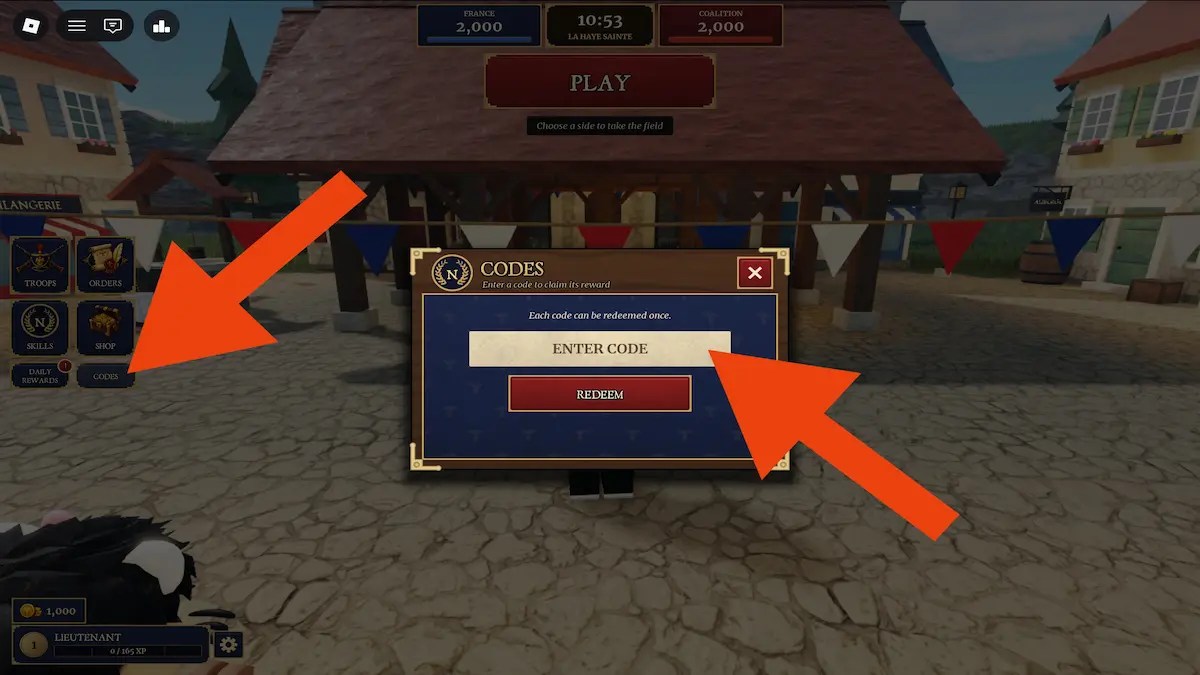
Promo codes are the fastest free Francs spike in Be a General! by Made Men Studio. This walkthrough exists because most “code broken” reports are actually tutorial gates, wrong UI panel, typos, or console players without a keyboard. Follow the steps once, then keep the live table on the Codes Hub for which strings still work. Pair this page with Getting Started, Earn Francs, and Console keyboard & mouse so redeeming is not the only thing you learn on day one.
As of the 16 November 2026 recheck, the active set is still three Francs codes: EMPIRE (1,100), SPECIALOPERATION (1,500), and PREUSSEN (900). EMPIRE remains the newest string in that trio. Always re-read Codes before you assume a fourth code exists—chat rumors move faster than studio promotions.
Before you redeem: clear the tutorial gate
Codes are locked behind onboarding on purpose. If you smash into a public lobby mid-tutorial or leave the experience during the first scripted lessons, the Codes control may never appear.
- Launch the official place Be a General! (Made Men Studio, place
95504100861294). - Complete the tutorial end to end until lobby tools unlock. You should understand basic selection and movement—not just skip cutscenes.
- Return to the lobby. Leave an active match if you are stuck in a battleground UI.
- Only then look for the Codes entry on the left side of the lobby interface.
If the button is still missing, restart tutorial progress from lobby options or rejoin the official place. Copycat experiences will not redeem Made Men Studio strings. Day-one context lives in Getting Started.
Exact redeem steps (PC and console with KB+M)
- Stand in the lobby with the Codes control visible on the left.
- Open Codes.
- Click the text field so a caret appears. On console, this is why a physical keyboard is mandatory—see Console keyboard & mouse.
- Type one code exactly:
EMPIRESPECIALOPERATIONPREUSSEN
- Press the on-screen Enter Code / Redeem control (or the equivalent confirm button).
- Wait for a success toast and a Francs balance update. Soft-rejoin the lobby if the currency UI lags one refresh.
- Repeat for the other active codes. Each code is typically once per account, not once per day.
Case sensitivity and typing hygiene
Treat codes as passwords, not suggestions:
- Prefer ALL CAPS exactly as listed on Codes.
- Do not insert spaces before/after the string.
- Do not replace
SPECIALOPERATIONwith spaced words or abbreviations. - Do not confuse
PREUSSENwith lookalike spellings from chat. - Paste carefully if you use clipboard macros; hidden newline characters can invalidate a redeem.
Console players: keyboard and mouse are not optional
The Roblox experience page calls out that console needs keyboard and mouse. Gamepad-only play fails the Codes field and fights multi-unit command. Before you blame the wiki:
- Connect USB or officially supported wireless KB+M.
- Confirm the on-screen keyboard is not eating focus in a half-open state.
- Sit in the lobby, not mid-match, when testing the Codes panel.
- If text still will not enter, rejoin the experience after the peripherals are connected.
Deeper setup and why command itself needs KB+M are covered in Console keyboard & mouse and Controls.
What to do with the Francs immediately after
Redeeming is step one; spending is step two. A clean order for new generals:
- Note your post-redeem balance (up to 3,500 Francs if all three active codes succeed).
- Fund a stable infantry core before prestige shopping.
- Add cavalry or artillery support so you are not a pure blob—see Army composition.
- Bank toward later elites such as Old Guard or Heavy Cuirassiers only after roles are covered—Tier List and Old Guard explain timing without inventing secret shop prices.
- Keep grinding match payouts with the habits in Earn Francs so codes remain a spike, not your whole economy.
Troubleshooting table
| Symptom | Likely cause | Fix |
|---|---|---|
| Codes button missing | Tutorial incomplete or wrong place | Finish tutorial; confirm place ID 95504100861294 |
| Invalid / wrong code | Typo, wrong case, extra space, expired string | Retype from Codes; remove spaces |
| Already redeemed | Account already claimed that string | Stop retrying; try only accounts you legitimately own |
| Success toast but no Francs | UI lag | Re-open lobby or soft-rejoin |
| Cannot type on console | No KB+M or focus issue | Attach keyboard and mouse; see Console guide |
| Code from Discord fails | Chat typo or already expired | Cross-check spelling on Codes; skim Updates |
| “New code” from a stranger | Scam or outdated screenshot | Ignore paid codes; wait for Discord + wiki confirmation |
Where new codes are announced
Made Men Studio does not publish a public official Trello. Watch:
- Discord invite
discord.com/invite/wkp6SAmbE(codes / announcement channels) - Made Men Studio Roblox group
- This wiki’s Codes and Updates hubs
- Canonical URLs collected on the Links Hub
After every Discord ping, redeem first, then adjust unlock plans—do not rebuild your entire roster because a meme channel shouted “nerf.”
Common mistakes that waste time
- Redeeming before the tutorial ends, then assuming codes are disabled forever.
- Entering codes mid-battle UI instead of the lobby.
- Using a gamepad on console and concluding the feature is broken.
- Spending the entire 3,500 Francs on one elite name before you can micro a basic line.
- Installing executors for “auto redeem” — unsafe and unnecessary; read Scripts if you are curious why public tools stay scarce.
Related pages
- Codes Hub — live active/expired tables
- Getting Started — day-one path before codes matter
- Earn Francs — sustainable income after the promo spike
- Console keyboard & mouse — hardware requirement deep dive
- Guides Hub — full tutorial map
- Updates Hub — when code rotations usually land
Redeem carefully once, bookmark Codes, and move your attention back to commanding Napoleonic armies. Francs from EMPIRE, SPECIALOPERATION, and PREUSSEN should accelerate a real plan—not become a daily ritual of mistyped retries.
Frequently Asked Questions
Quick answers to the most common questions.
Where is the Codes button in Be a General?
After you finish the tutorial, open the lobby and use the Codes control on the left side of the lobby UI. It will not appear reliably mid-match or before onboarding completes.
Are Be a General codes case sensitive?
Treat them as case sensitive. Enter EMPIRE, SPECIALOPERATION, and PREUSSEN exactly as shown on the Codes Hub with no extra spaces.
Why can’t I type codes on console?
Console play requires a keyboard and mouse. Gamepad-only setups cannot drive the Codes field or full army command comfortably.
What should I buy after redeeming EMPIRE and the other codes?
Fund a balanced early roster first—infantry core, then support options—before dumping every Franc into a single elite. See Earn Francs and Army composition.
A Discord code failed for me. What next?
Recheck spelling against the Codes Hub, confirm you finished the tutorial, and see Updates for rotations. Many chat posts include typos or expired strings.